
生命周期
生命周期允许我们在预定义的点拦截一个重要事件,从而根据需要自定义服务器的行为。
Elysia的生命周期事件可以如下所示。 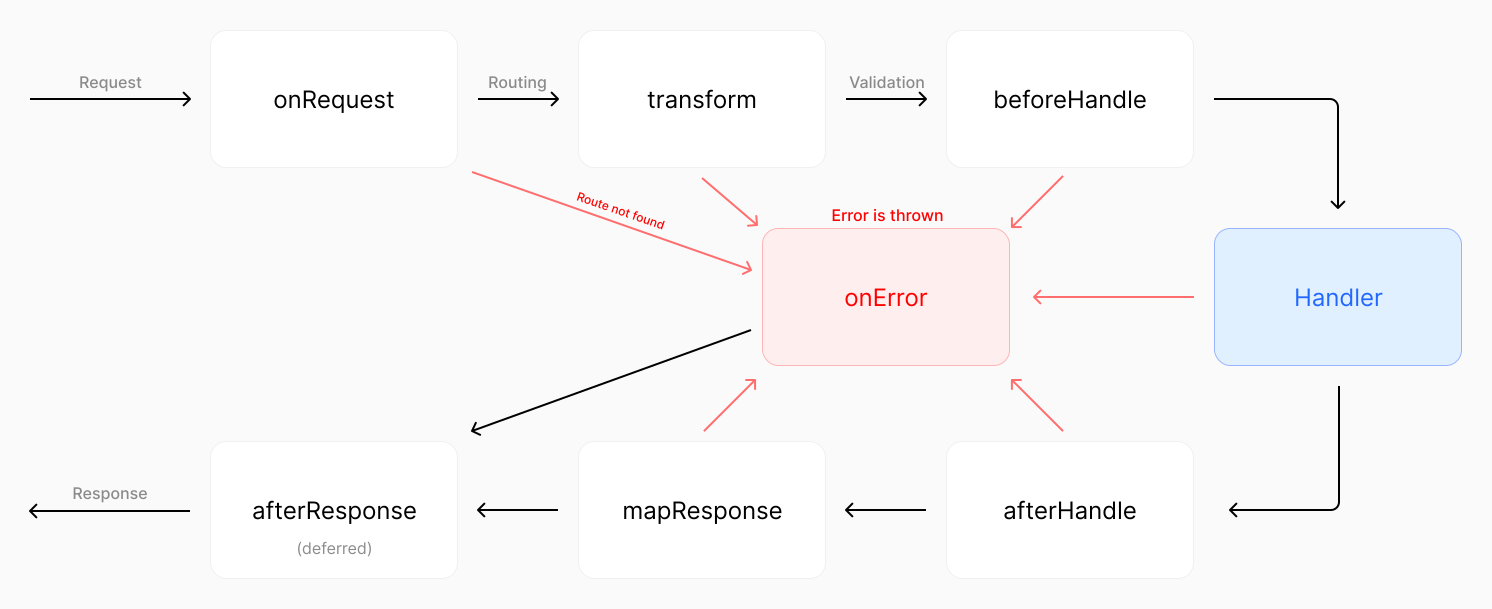
点击图片放大
以下是按顺序排列的生命周期事件:
Elysia的生命周期可以用如下图示表示。
点击图片放大
为什么
假设我们想返回一些 HTML。
通常,我们会设置 "Content-Type" 头为 "text/html",以便浏览器能够渲染它。
但是手动为每个路由设置这个头信息很繁琐。
那么,如果框架能够自动检测响应是 HTML 并自动为您设置头部怎么办?这就是生命周期概念的由来。
钩子
每个拦截 生命周期事件 的函数都称为 “钩子”。
(函数“钩入”(hook) 生命周期事件)
钩子分为两种类型:
- 本地钩子 (Local Hook):在特定路由上执行
- 拦截钩子 (Interceptor Hook):在钩子注册后每个路由执行
TIP
钩子接收与处理程序相同的上下文,你可以把它想象成在特定点添加的路由处理程序。
本地钩子
本地钩子在特定路由上执行。
要使用本地钩子,你可以将钩子内联到路由处理程序中:
import { Elysia } from 'elysia'
import { isHtml } from '@elysia/html'

new Elysia()
    .get('/', () => '<h1>Hello World</h1>', {
        afterHandle({ responseValue, set }) {
            if (isHtml(responseValue))
                set.headers['Content-Type'] = 'text/html; charset=utf8'
        }
    })
    .get('/hi', () => '<h1>你好,世界</h1>')
    .listen(3000)
响应应列出如下:
| 路径 | Content-Type |
|---|---|
| / | text/html; charset=utf8 |
| /hi | text/plain; charset=utf8 |
拦截钩子
钩子注册后,会作用于当前实例的每个处理程序。
要添加拦截钩子,可以使用 .on 加上驼峰形式的生命周期事件:
import { Elysia } from 'elysia'
import { isHtml } from '@elysia/html'

new Elysia()
    .get('/none', () => '<h1>Hello World</h1>')
    .onAfterHandle(({ responseValue, set }) => {
        if (isHtml(responseValue))
            set.headers['Content-Type'] = 'text/html; charset=utf8'
    })
    .get('/', () => '<h1>你好,世界</h1>')
    .get('/hi', () => '<h1>你好,世界</h1>')
    .listen(3000)
响应应列出如下:
| 路径 | Content-Type |
|---|---|
| /none | text/plain; charset=utf8 |
| / | text/html; charset=utf8 |
| /hi | text/html; charset=utf8 |
其它插件的事件也会应用到路由上,所以代码顺序很重要。
代码顺序
事件只会应用到注册之后的路由。
如果你在插件之前放置 onError,插件将不会继承 onError 事件。
import { Elysia } from 'elysia'

new Elysia()
 	.onBeforeHandle(() => {
        console.log('1')
    })
	.get('/', () => '你好')
    .onBeforeHandle(() => {
        console.log('2')
    })
    .listen(3000)
控制台应输出如下内容:
1注意没有输出 2,因为事件是在路由之后注册的,所以不会作用于该路由。
这同样适用于插件:
import { Elysia } from 'elysia'

new Elysia()
	.onBeforeHandle(() => {
		console.log('1')
	})
	.use(someRouter)
	.onBeforeHandle(() => {
		console.log('2')
	})
	.listen(3000)
这个例子中,只会打印 1,因为事件是在插件之后注册的。
每个事件都遵循相同的规则,onRequest 除外。 因为 onRequest 在请求发生时执行,它不知道应该应用到哪个路由,所以它是一个全局事件
请求 (Request)
每个新请求执行的第一个生命周期事件。
由于 onRequest 仅提供最重要的上下文以减少额外开销,建议用于以下场景:
- 缓存
- 速率限制 / IP或地区限制
- 分析统计
- 提供自定义头部,例如 CORS
示例
以下是强制限制某个 IP 地址访问速率的伪代码。
import { Elysia } from 'elysia'

new Elysia()
    .use(rateLimiter)
    .onRequest(({ rateLimiter, ip, set, status }) => {
        if (rateLimiter.check(ip)) return status(420, '保持冷静')
    })
    .get('/', () => '你好')
    .listen(3000)
如果 onRequest 返回了一个值,它将被用作响应,其余的生命周期将被跳过。
预上下文 (Pre-context)
onRequest 上下文的类型为 PreContext,这是 Context 的一个最小表示,具有以下属性: request: Request
- set:
Set - store
- decorators
上下文不提供派生值 (derived),因为它基于 onTransform 事件。
解析 (Parse)
解析是 Express 中主体解析器的等价物。
用于解析请求体的函数;其返回值将附加到 Context.body。如果没有,Elysia 将继续迭代由 onParse 分配的其他解析函数,直到 body 被赋值或所有解析器都已执行完毕。
默认情况下,Elysia 解析以下内容类型的请求体:
text/plainapplication/jsonmultipart/form-dataapplication/x-www-form-urlencoded
建议通过 onParse 事件提供 Elysia 默认不支持的自定义主体解析器。
示例
以下是基于自定义头部类型解析请求体的示例代码。
import { Elysia } from 'elysia'

new Elysia().onParse(({ request, contentType }) => {
    if (contentType === 'application/custom-type') return request.text()
})
返回值会赋值给 Context.body。如果没有返回,Elysia 将继续迭代 onParse 栈中的其他解析函数,直到请求体被赋值或所有解析器执行完成。
上下文
onParse 上下文从 Context 扩展而来,并附加以下属性:
- contentType: 请求的 Content-Type 头部
所有上下文基于标准上下文,可在路由处理程序中像普通上下文一样使用。
解析器
默认情况下,Elysia 会尝试提前识别请求体的类型,并选择最合适的解析器以提高性能。
Elysia 会读取路由的 body 类型定义来推断请求体类型。
例如:
import { Elysia, t } from 'elysia'

new Elysia().post('/', ({ body }) => body, {
    body: t.Object({
        username: t.String(),
        password: t.String()
    })
})
Elysia 读取 body schema 并发现类型完全是一个对象,因此 body 很可能是 JSON。Elysia 然后会提前选择 JSON 请求体解析函数并尝试解析 body。
Elysia 用于选择请求体解析器类型的标准如下:
application/json:当体类型为t.Objectmultipart/form-data:体类型为一级深度包含t.File的t.Objectapplication/x-www-form-urlencoded:体类型为t.URLEncodedtext/plain:其他基本类型
这使 Elysia 能够提前优化体解析性能,减少编译时开销。
显式解析器
不过,在某些场景下,如果 Elysia 未能选择正确的请求体解析函数,我们可以通过指定 type 显式告诉 Elysia 使用某个函数。
import { Elysia } from 'elysia'

new Elysia().post('/', ({ body }) => body, {
    // application/json 的简写
    parse: 'json'
})
这样可以在复杂场景中控制 Elysia 选择合适的解析器。
parse 可使用以下类型:
type ContentType = |
    // 'text/plain' 简写
    | 'text'
    // 'application/json' 简写
    | 'json'
    // 'multipart/form-data' 简写
    | 'formdata'
    // 'application/x-www-form-urlencoded' 简写
    | 'urlencoded'
    // 跳过解析
    | 'none'
    | 'text/plain'
    | 'application/json'
    | 'multipart/form-data'
    | 'application/x-www-form-urlencoded'
跳过请求体解析
当你需要将第三方库与诸如 trpc 或 orpc 这样的 HTTP 处理器集成,并且它抛出 Body is already used 时。
当你需要集成第三方 HTTP 处理库(如 trpc、orpc),并遇到抛出 Body is already used 错误时,可以跳过 Elysia 的请求体解析。
这是因为 Web 标准中请求体只能被读取一次。
Elysia 和第三方库都有各自的解析器,可以通过指定 parse: 'none' 来跳过 Elysia 端的解析。
import { Elysia } from 'elysia'

new Elysia()
	.post(
		'/',
		({ request }) => library.handle(request),
		{
			parse: 'none'
		}
	)
自定义解析器
你可以使用 parser 注册自定义解析器:
import { Elysia } from 'elysia'

new Elysia()
    .parser('custom', ({ request, contentType }) => {
        if (contentType === 'application/elysia') return request.text()
    })
    .post('/', ({ body }) => body, {
        parse: ['custom', 'json']
    })
转换 (Transform)
在验证之前执行,目的是修改上下文以适配验证或附加新值。
建议在以下场景使用转换:
- 修改现有上下文以符合验证。
derive基于onTransform,并支持提供类型。
示例
以下示例展示了如何使用转换将参数修改为数字类型。
import { Elysia, t } from 'elysia'

new Elysia()
    .get('/id/:id', ({ params: { id } }) => id, {
        params: t.Object({
            id: t.Number()
        }),
        transform({ params }) {
            const id = +params.id

            if (!Number.isNaN(id)) params.id = id
        }
    })
    .listen(3000)
派生 (Derive)
在验证之前将新值附加到上下文。它与转换存在于同一个调用栈。
与 state 和 decorate 不同,后两者是在服务器启动前分配值,而 derive 会在每次请求发生时分配一个属性。这使我们能够将一部分信息提取到一个属性中。
import { Elysia } from 'elysia'

new Elysia()
    .derive(({ headers }) => {
        const auth = headers['Authorization']

        return {
            bearer: auth?.startsWith('Bearer ') ? auth.slice(7) : null
        }
    })
    .get('/', ({ bearer }) => bearer)
因为 derive 会在每个请求开始时赋值,所以能够访问请求属性,比如 headers、query、body,而 store 和 decorate 则不能。
与 state 和 decorate 不同,derive 分配的属性是独有的,不会与其他请求共享。
队列
derive 和 transform 存储在同一个队列。
import { Elysia } from 'elysia'

new Elysia()
    .onTransform(() => {
        console.log(1)
    })
    .derive(() => {
        console.log(2)

        return {}
    })
控制台应输出:
1
2
处理前 (Before Handle)
在验证之后和主路由处理程序之前执行。
目的是提供自定义验证,满足运行主处理程序之前的特殊需求。
建议在以下场景使用处理前:
- 访问权限检查:授权、用户登录
- 针对数据结构的自定义请求要求
示例
以下示例展示了如何通过处理前校验用户登录状态。
import { Elysia } from 'elysia'
import { validateSession } from './user'

new Elysia()
    .get('/', () => '你好', {
        beforeHandle({ set, cookie: { session }, status }) {
            if (!validateSession(session.value)) return status(401)
        }
    })
    .listen(3000)
响应应列出如下:
| 是否已登录 | 响应 |
|---|---|
| ❌ | 未授权 |
| ✅ | 你好 |
守卫 (Guard)
当需要将相同的处理前应用于多个路由时,可以使用 guard 来批量应用该处理前。
import { Elysia } from 'elysia'
import { signUp, signIn, validateSession, isUserExists } from './user'

new Elysia()
    .guard(
        {
            beforeHandle({ set, cookie: { session }, status }) {
                if (!validateSession(session.value)) return status(401)
            }
        },
        (app) =>
            app
                .get('/user/:id', ({ body }) => signUp(body))
                .post('/profile', ({ body }) => signIn(body), {
                    beforeHandle: isUserExists
                })
    )
    .get('/', () => '你好')
    .listen(3000)
解析 (Resolve)
在验证之后向上下文添加新值。它和处理前位于同一个调用栈。
解析的语法与 derive 相同,以下示例展示从 Authorization 插件获取 bearer token。
import { Elysia, t } from 'elysia'

new Elysia()
    .guard(
        {
            headers: t.Object({
                authorization: t.TemplateLiteral('Bearer ${string}')
            })
        },
        (app) =>
            app
                .resolve(({ headers: { authorization } }) => {
                    return {
                        bearer: authorization.split(' ')[1]
                    }
                })
                .get('/', ({ bearer }) => bearer)
    )
    .listen(3000)
resolve 和 onBeforeHandle 存储在同一个队列中。
import { Elysia } from 'elysia'

new Elysia()
    .onBeforeHandle(() => {
        console.log(1)
    })
    .resolve(() => {
        console.log(2)

        return {}
    })
    .onBeforeHandle(() => {
        console.log(3)
    })
控制台应输出:
1
2
3
与 derive 一样,由 resolve 分配的属性是唯一的,不会与其他请求共享。
守卫解析
由于 resolve 不适用于本地钩子,建议用守卫封装 resolve 事件。
import { Elysia } from 'elysia'
import { isSignIn, findUserById } from './user'

new Elysia()
    .guard(
        {
            beforeHandle: isSignIn
        },
        (app) =>
            app
                .resolve(({ cookie: { session } }) => ({
                    userId: findUserById(session.value)
                }))
                .get('/profile', ({ userId }) => userId)
    )
    .listen(3000)
处理后 (After Handle)
在主处理程序后执行,用于将处理前和路由处理程序的返回值映射到合适的响应。
建议在以下情况使用处理后:
- 转换请求结果,例如压缩、事件流
- 根据响应内容添加自定义头部,如 Content-Type
示例
以下示例展示了如何使用处理后给响应添加 HTML 内容类型头。
import { Elysia } from 'elysia'
import { isHtml } from '@elysia/html'

new Elysia()
    .get('/', () => '<h1>你好,世界</h1>', {
        afterHandle({ response, set }) {
            if (isHtml(response))
                set.headers['content-type'] = 'text/html; charset=utf8'
        }
    })
    .get('/hi', () => '<h1>你好,世界</h1>')
    .listen(3000)
响应应列出如下:
| 路径 | Content-Type |
|---|---|
| / | text/html; charset=utf8 |
| /hi | text/plain; charset=utf8 |
返回值
如果 afterHandle 返回了值,则该值将作为新的响应值使用,除非该值为 undefined。
上述示例也可以改写为如下形式:
import { Elysia } from 'elysia'
import { isHtml } from '@elysia/html'

new Elysia()
    .get('/', () => '<h1>你好,世界</h1>', {
        afterHandle({ response, set }) {
            if (isHtml(response)) {
                set.headers['content-type'] = 'text/html; charset=utf8'
                return new Response(response)
            }
        }
    })
    .get('/hi', () => '<h1>你好,世界</h1>')
.listen(3000)与beforeHandle不同的是,一旦从 afterHandle 返回一个值,后续的 afterHandle 迭代不会被跳过。
上下文
onAfterHandle 的上下文继承自 Context,并额外包含 response 属性,即返回给客户端的响应。
它基于标准上下文,可在路由处理程序中像普通上下文一样使用。
映射响应 (Map Response)
在 afterHandle 之后执行,用于自定义响应映射。
建议在以下场景使用映射响应:
- 响应压缩
- 映射值到符合 Web 标准的响应对象
示例
以下示例使用 mapResponse 实现响应压缩。
import { Elysia } from 'elysia'

const encoder = new TextEncoder()

new Elysia()
    .mapResponse(({ responseValue, set }) => {
        const isJson = typeof responseValue === 'object'

        const text = isJson
            ? JSON.stringify(responseValue)
            : (responseValue?.toString() ?? '')

        set.headers['Content-Encoding'] = 'gzip'

        return new Response(Bun.gzipSync(encoder.encode(text)), {
            headers: {
                'Content-Type': `${
                    isJson ? 'application/json' : 'text/plain'
                }; charset=utf-8`
            }
        })
    })
    .get('/text', () => '映射响应')
    .get('/json', () => ({ map: '响应' }))
    .listen(3000)
与 parse 和 beforeHandle 类似,一旦返回一个值,后续的 mapResponse 迭代将被跳过。
Elysia 会自动合并 mapResponse 中的 set.headers,你无需手动将 set.headers 附加到 Response 上。
错误处理(On Error)
设计用于处理错误。生命周期中的任何阶段发生异常时都会触发。
建议在以下情况下使用 onError:
- 提供自定义错误消息
- 容错处理、错误处理器或重试请求
- 日志记录和分析
示例
Elysia 会捕获处理程序中抛出的所有错误,基于错误代码进行处理,并传递到 onError 中间件中。
import { Elysia } from 'elysia'

new Elysia()
    .onError(({ error }) => {
        return new Response(error.toString())
    })
    .get('/', () => {
        throw new Error('服务器正在维护')

        return '无法到达'
    })
通过 onError 我们可以捕获并将错误转换为自定义消息。
TIP
必须在你想应用的处理程序之前注册 onError。
自定义404消息
例如,自定义返回 404 消息:
import { Elysia, NotFoundError } from 'elysia'

new Elysia()
    .onError(({ code, status, set }) => {
        if (code === 'NOT_FOUND') return status(404, '未找到 :(')
    })
    .post('/', () => {
        throw new NotFoundError()
    })
    .listen(3000)
上下文
onError 上下文继承自 Context,并包含以下额外属性:
- error:抛出的错误对象
- code:错误代码
错误代码
Elysia 的错误代码包括:
- NOT_FOUND
- PARSE
- VALIDATION
- INTERNAL_SERVER_ERROR
- INVALID_COOKIE_SIGNATURE
- INVALID_FILE_TYPE
- UNKNOWN
- number(HTTP 状态码)
默认情况下,抛出的错误代码为 UNKNOWN。
TIP
如果没有返回错误响应,将使用 error.name 返回错误信息。
本地错误
和其他生命周期事件一样,我们可以在 scope 中通过守卫提供错误处理:
import { Elysia } from 'elysia'

new Elysia()
    .get('/', () => '你好', {
        beforeHandle({ set, request: { headers }, error }) {
            if (!isSignIn(headers)) throw error(401)
        },
        error() {
            return 'Handled'
        }
    })
    .listen(3000)
响应后 (After Response)
在响应发送到客户端后执行。
建议在以下场景使用响应后:
- 清理资源
- 日志记录和分析
示例
以下示例使用响应后处理程序打印响应时间。
import { Elysia } from 'elysia'

new Elysia()
    .onAfterResponse(() => {
        console.log('响应', performance.now())
    })
    .listen(3000)
控制台应输出:
响应 0.0000
响应 0.0001
响应 0.0002
Response
类似于 映射响应,afterResponse 也接受 responseValue。
import { Elysia } from 'elysia'

new Elysia()
	.onAfterResponse(({ responseValue }) => {
		console.log(responseValue)
	})
	.get('/', () => '你好')
	.listen(3000)
onAfterResponse 中的 response 不是 Web 标准的 Response 对象,而是处理程序返回的值。
要获取处理程序返回的头部和状态码,我们可以访问上下文中的 set。
import { Elysia } from 'elysia'

new Elysia()
	.onAfterResponse(({ set }) => {
		console.log(set.status, set.headers)
	})
	.get('/', () => '你好')
	.listen(3000)